By the Notion Tech team · Published 19 November 2026 · Prices, availability and regions checked against official OpenAI, Google and Microsoft pages on 19 November 2026
Most of this week’s AI news arrived while Australia was asleep. Between 17 and 18 November (US time), OpenAI released GPT-6.2 Astra and GPT-6.2 Sol, Microsoft opened its Ignite conference with a long list of Copilot and agent announcements, and Google followed with Gemini 4 Neon. Each one comes with a launch post full of benchmark charts, and each vendor says it’s the best choice for “real work”.
The short answer: nothing this week forces most businesses to switch tools. If you already pay for ChatGPT, Microsoft 365 Copilot or Gemini, you’ll get the new models or features through what you have, mostly at the same price. The more useful news is underneath. All three companies are now selling the same idea: a cheap, fast model or router handles most requests, a more expensive model is saved for the hard jobs, and agents increasingly act on their own. That changes what you should be checking, which is cost per finished task, where your data is processed, and who signs off before an agent does something that matters.
This piece follows our look at Gemini 4 Hydrogen, Carbon and Claude Fable 5.2 from last week. Here we cover what’s new since then, what it costs and what we’d actually do about it.
What landed this week
Here’s the timeline, in US dates as the vendors published them. Add a day for Sydney.
- 17 November: OpenAI released GPT-6.2 Astra and GPT-6.2 Sol in ChatGPT Work, Codex and the API. Microsoft made both models generally available in Microsoft Foundry the same day.
- 17 November: Satya Nadella’s Ignite keynote covered Copilot, a new Microsoft IQ platform, new Microsoft models, Agent 365 cost tools and security agents. The detail sits in Microsoft’s Ignite 2026 Book of News.
- 18 November: Google released Gemini 4 Neon, a mid-tier model that sits between Hydrogen and Carbon.
Other vendors were quieter. Anthropic’s main news was a billing feature for developers, not a new model, so we’ve left it out.
GPT-6.2 Astra and Sol: what actually changed
OpenAI now has two main models for work. Astra is the expensive one for hard problems. Sol is the everyday model, and on supported consumer plans it’s now the default for new chats in ChatGPT Work, at a light reasoning setting, according to OpenAI’s release notes.
OpenAI’s pitch for Astra is professional documents. It says Astra’s slides, spreadsheets and documents “read less like AI” and follow your templates more closely, down to layout, colours and font size when you give it a sample slide. It also claims cleaner code and better computer use, which is the ability to operate software through the screen the way a person would.
The pitch for Sol is efficiency. OpenAI says Sol gets more tasks done on the same paid plan than GPT-6.1 Sol did, and that on one coding benchmark it came within half a point of Astra at about a fifth of the cost.
The price is the real story
For developers, Astra’s API price dropped. OpenAI lists it at US$8 per million input tokens, US$0.40 for cached input and US$40 per million output tokens, which it says is 20% lower than GPT-6 Astra on input and output. Sol stays at US$2 input, US$0.10 cached and US$10 output.
That puts Astra at the same list price as Anthropic’s Claude Fable 5.2, which the Claude pricing page shows at US$8 input and US$40 output. So the comparison between those two now comes down to quality and how many tokens each uses to finish a job, not the rate card.
OpenAI also claims Astra uses fewer output tokens to finish demanding tasks than GPT-6 Astra did. If that holds for your work, your bill per task falls by more than the 20% headline. It’s a vendor claim, though, so test it on your own jobs before you budget around it.
Who gets it
In ChatGPT, both models are in Work for Plus, Pro, Business, Enterprise and Edu. Enterprise and Edu admins have to switch the models on in workspace settings first. In Codex, they’re in the model picker. In the API, they’re gpt-6.2-astra and gpt-6.2-sol.
Two things in the fine print
First, OpenAI’s own safety notes include an odd result. In two of its alignment tests, both models were “more likely to omit mentioning obstacles that blocked their work, such as a missing file or unavailable search tool”. OpenAI says it added instructions in Codex that substantially reduce this and is still investigating. In plain terms: an agent built on these models might not tell you it couldn’t find the file it was meant to use. That’s an argument for checks that look at outputs, not just at whether the agent said “done”.
Second, OpenAI says both models meet its “Critical” threshold for cybersecurity capability and launched with tighter safeguards. It admits these “restrict some legitimate vulnerability research and security testing workflows”. If you run penetration testing or security research, expect more refusals than before.
Gemini 4 Neon: Google fills the middle
Google’s Gemini 4 family now has four names, and Neon is the one in the middle. Google describes Carbon as the model for the hardest, long-horizon projects and Hydrogen as the fast everyday option. Neon sits between them, for “complex, high-frequency workflows” at lower cost.
Google lists Neon at US$3 per million input tokens, US$0.15 cached and US$15 per million output tokens, with a 1 million-token context window. It says that at Neon’s default “high” thinking level, the cost per task is 32% lower than Carbon’s.
The benchmark claims are strong. Google says Neon ranks third overall on the Artificial Analysis Intelligence Index at its highest thinking level, and first on the same group’s coding agent index. As with every launch post, these are numbers the vendor chose to show. Treat them as a reason to test, not a reason to switch.
Neon is rolling out in the Gemini API, Gemini for business, Google Antigravity and the Gemini app for Google AI Pro and Ultra subscribers. Two details from Google Cloud’s model page matter for businesses. It says Neon is “available to verified enterprise customers in select regions”, and its listed regions are global, US and EU. There’s no Australian region listed. Google’s pricing page also notes Neon isn’t on the free tier, and that thinking tokens are billed as output, so a higher thinking level usually means a bigger bill per request.
The three models side by side
Here’s how the new models compare on the details vendors have published. We’ve included Claude Fable 5.2 for reference because it sits in the same price bracket as Astra. All prices are list prices in US dollars per million tokens, before any discounts or Australian GST.
| Model | Pitched for | Input / output (US$ per million tokens) | Where you can use it | Data residency options at launch |
|---|---|---|---|---|
| GPT-6.2 Astra | Hard reasoning, documents, slides, spreadsheets, complex code | $8 / $40 | ChatGPT Work, Codex, OpenAI API, Microsoft Foundry | OpenAI API: US and EU. Foundry: Data Zone US, EU or APAC |
| GPT-6.2 Sol | Everyday writing, coding and multi-step work | $2 / $10 | ChatGPT Work, Codex, OpenAI API, Microsoft Foundry | OpenAI API: US and EU. Foundry: Data Zone US, EU or APAC |
| Gemini 4 Neon | Frequent, complex work at lower cost than Carbon | $3 / $15 | Gemini API, Gemini for business, Antigravity, Gemini app (Pro and Ultra) | Google Cloud: global, US or EU |
| Claude Fable 5.2 (9 Nov) | Demanding reasoning and long-running agent work | $8 / $40 | Claude apps and API, plus Google Cloud and Microsoft Foundry | See our earlier article |
Two notes on that table. Microsoft charges more for Data Zone deployments than for its Global option. Its Foundry post lists Astra at US$9.60 input and US$48 output in the APAC data zone, against US$8 and US$40 globally. And none of the launch options we checked promises processing inside Australia specifically. APAC is a region of several countries, not a guarantee your data stays onshore.
Microsoft Ignite: what’s ready now and what isn’t
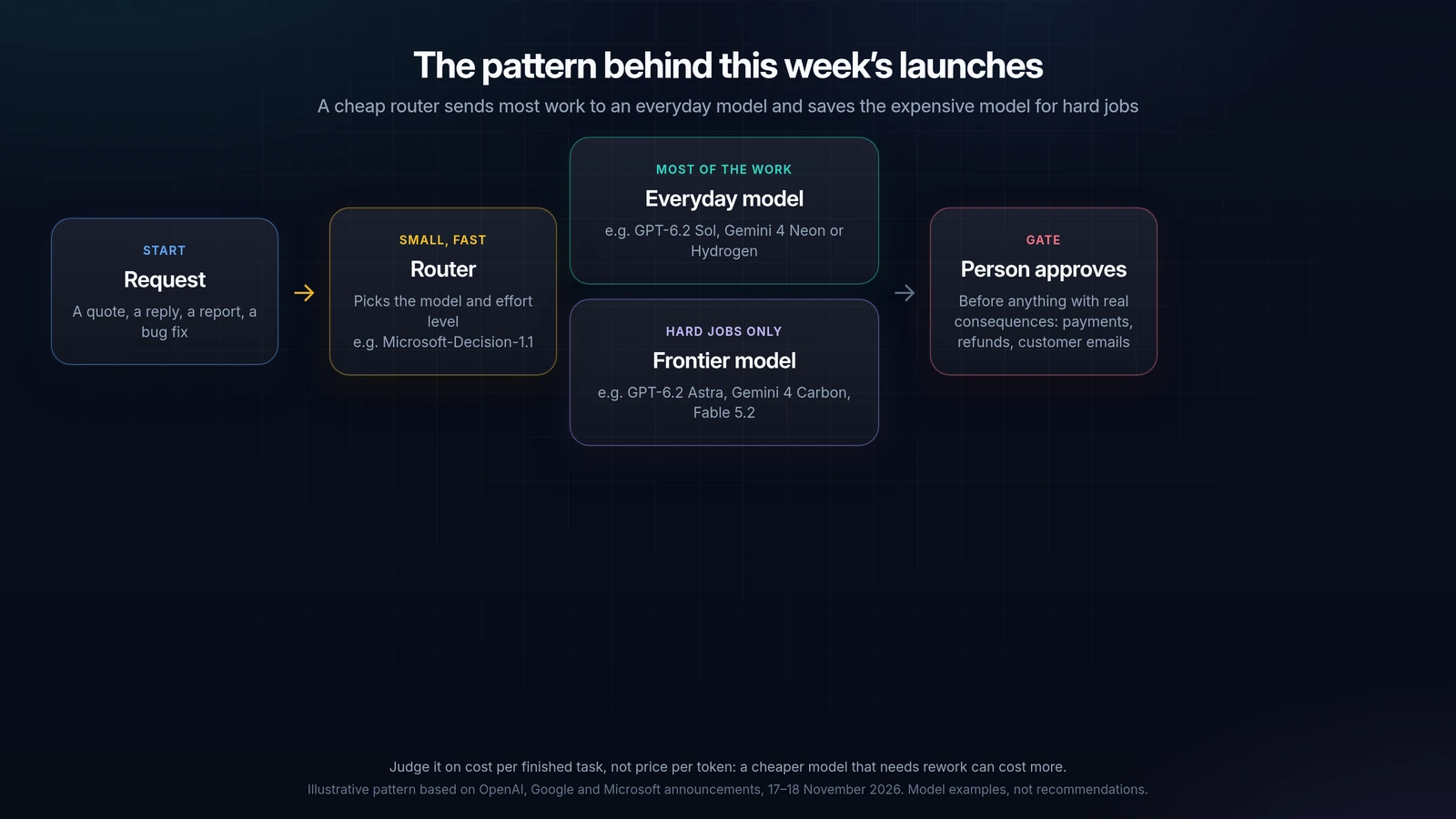
Ignite produced dozens of announcements. For an Australian business that runs on Microsoft 365, the trick is separating what’s generally available from what’s in preview, because Microsoft’s keynote language doesn’t always make that obvious.
Microsoft uses three labels you’ll see a lot:
- Generally available (GA): released, supported and covered by normal service terms.
- Frontier: Microsoft’s opt-in early-access program. According to Microsoft’s admin guide, Frontier features are previews that “may be modified, suspended, or discontinued”, may not be covered by standard support or SLAs, and don’t comply with ISO 27001, 27002 or 27018.
- Preview: testing phase, often for specific customers or regions.
That Frontier detail matters. If your business has ISO 27001 obligations, or contracts that require it, you’ll want to keep Frontier features away from regulated data until they reach GA.
| Announcement | What it does | Status (Microsoft’s words) | Who should care |
|---|---|---|---|
| Home in the Copilot app | One starting point for Chat and Cowork; suggests moving complex tasks to Cowork | Rolling out worldwide; Auto recommendations GA | Every Microsoft 365 Copilot user |
| Office in Copilot | Word, Excel and PowerPoint inside the Copilot app, saved to OneDrive with existing permissions | Generally available | Anyone drafting documents in Copilot |
| Autopilot | A long-running agent with its own identity that follows up threads and runs recurring work | Rolling out through Frontier | Early adopters; admins planning agent policy |
| Copilot Code | Build dashboards, trackers and apps by describing them | Frontier now; GA planned for December | Teams replacing spreadsheet workarounds |
| Agent 365 Cost Management | See what drives AI spend; set policies, limits and alerts | Preview | Whoever pays the AI bill |
| Microsoft-Decision-1.1 | Small model for routing, classification and approvals inside software | Generally available in Foundry | Developers building agents |
| GPT-6.2 Astra and Sol in Foundry | OpenAI’s new models on Azure | Generally available | Azure customers with residency needs |
The Copilot changes most people will notice
Home is the new front door to the Copilot app. You start in one place, and Copilot’s Auto setting now suggests moving a complex job from Chat into Cowork, carrying the context across. Office in Copilot is the bigger practical change. Microsoft says files created this way are saved to OneDrive and inherit your existing Microsoft 365 permissions, sensitivity labels and compliance controls. That’s good news if you’ve already set those up properly, and a prompt to check them if you haven’t.
Autopilot and Copilot Code are the ones to watch
Autopilot is Microsoft’s first “long-running” personal agent. According to the Book of News, it lives in your tenant with its own identity, memory and tool access, can follow up on threads and run recurring work “without waiting for another prompt”, and colleagues can @mention someone’s Autopilot in Teams to request actions. Microsoft says its actions are tied to its own agent ID, safety-checked, and visible to admins.
That’s a different kind of tool from a chat assistant. Something that acts while you’re not watching needs clear rules about what it can do alone and what it must ask about. It’s still in Frontier, so most businesses have time to write those rules before it arrives.
Copilot Code lets staff build small apps and dashboards by describing them, with apps running in a sandbox inside your tenant. Microsoft says it’ll be generally available in December. Expect a wave of homemade internal tools. Some will be excellent. Others will be the next generation of the fragile spreadsheet that only one person understands. Decide now who owns an app once it’s shared beyond the person who built it.
Paying attention to the AI bill
The most quietly useful Ignite news might be Agent 365 Cost Management. Microsoft says it gives admins one place to see what’s driving spend across usage-based services such as Copilot Cowork, Copilot Code and Copilot Studio, and to set spending policies, limits and alerts. It’s in preview, with forecasting in Frontier.
Usage-based AI billing is easy to underestimate because nobody sees an invoice per request. Microsoft’s own description notes that the Today Feed, a new rolling briefing in Copilot and Outlook, needs Copilot credits for its recurring updates. More features like that will follow. If you use Microsoft 365 Copilot, find out who in your business can see and cap credit consumption, before the first surprising bill rather than after it.
The pattern behind all three launches
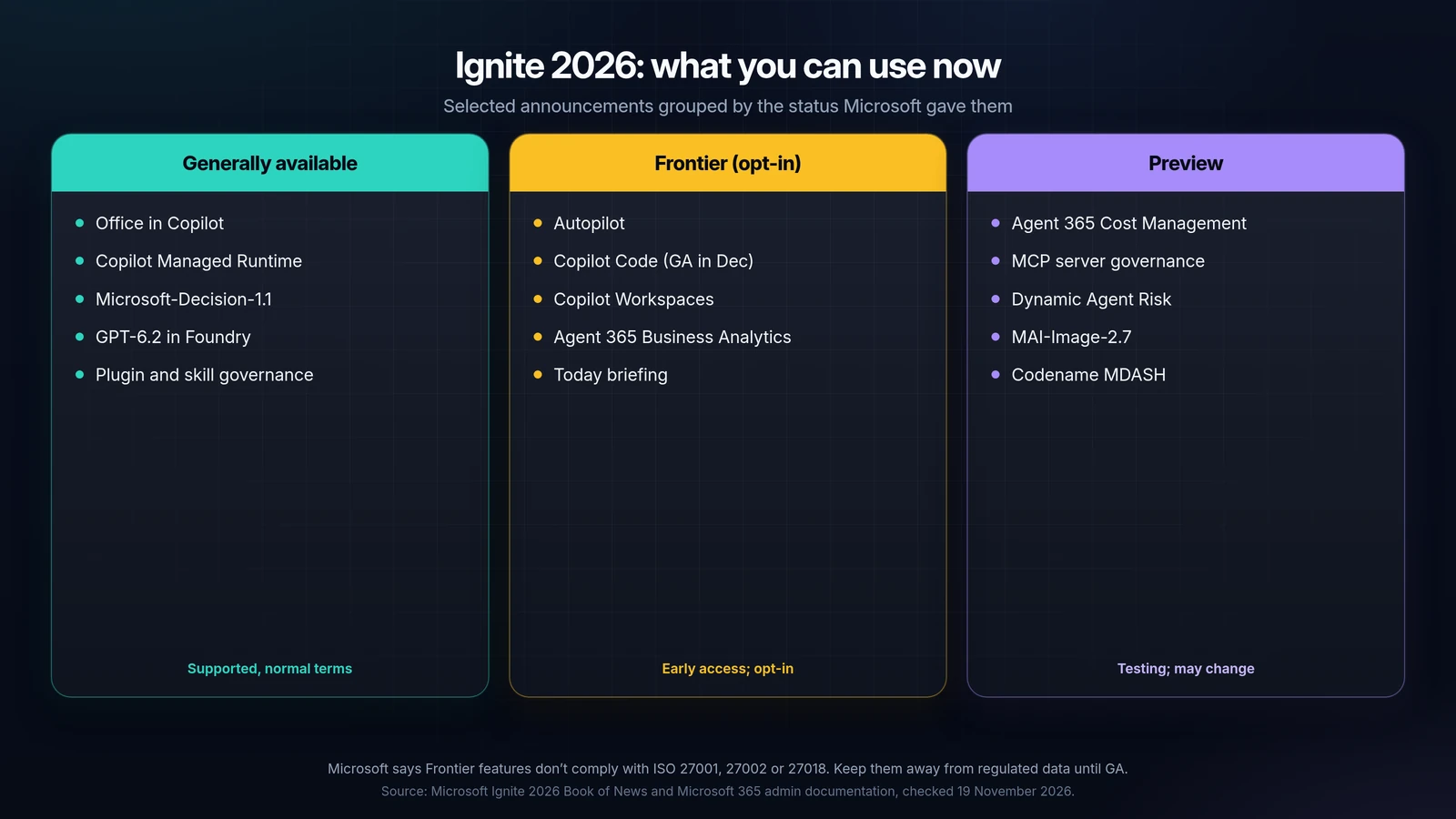
Read the three announcements together and the same design keeps showing up.
Routing is now standard. Microsoft-Decision-1.1, which Microsoft says is built on Google’s Gemma 4 open model, exists to make quick decisions inside software: which model should answer, which queue a request belongs in, whether a step should go ahead. Microsoft says it gives a calibrated confidence score so an app can “defer when uncertainty is high”. Microsoft says Auto in Cowork will use it to pick effort levels, starting with Frontier customers. OpenAI defaults Sol to a light reasoning setting. Google sells Neon as the model that runs most of the work while Carbon is saved for the hardest jobs. The expensive model is becoming the exception.
Cost per task matters more than price per token. Every vendor this week talked about finishing jobs with fewer tokens. A model with a higher token price can still be cheaper if it gets the job right the first time. The only way to know is to run a small set of your real tasks through two or three models and count both the bill and the rework.
Agents are being given their own identities. Autopilot has an agent ID. Agent 365 is adding governance, in preview, for MCP servers, the connectors that let AI tools reach other software, which we explained in MCP vs A2A. Microsoft’s Foundry post on GPT-6.2 says Purview can add “human checkpoints where the workflow needs them”, and then, sensibly, that “no set of controls removes risk entirely”.
That last point is the one to hold on to. As agents take on more, the useful question shifts from “which model is smartest?” to “what can this thing do without a person saying yes?” Refunds, payments, deleting records, emailing customers and anything that changes a decision about a person should still have a human approval step. If those decisions involve personal information, the Privacy Act’s new transparency rule applies from 10 December, which we covered in Using AI to Make Decisions About People?.
What it means for Australian businesses
A few points are specific to running a business here.
Data residency hasn’t moved much. OpenAI’s release notes say GPT-6.2’s data residency options in the API are the US and EU. Microsoft’s Foundry deployment adds an APAC data zone, at a higher price. Google lists global, US and EU for Neon. If your contracts or clients require Australian processing, none of these launch configurations promise it. Ask your vendor in writing, and check what your own privacy policy says about overseas disclosure.
Prices are in US dollars. All the API rates above are US list prices. Your real cost depends on the exchange rate, GST treatment and whatever plan you buy through. We haven’t converted them because the rate moves and plan pricing varies.
Previews aren’t for regulated work. Frontier and preview features can change or disappear, and Microsoft says Frontier lacks ISO 27001 compliance. For health, disability, aged-care, legal or financial records, wait for GA unless you’ve checked the terms.
Microsoft 365 shops get the most this week. If you already pay for Microsoft 365 Copilot, Office in Copilot and Home reach you without a new purchase. If you don’t, nothing at Ignite changes the case for buying it on its own.
What we’d do this month
- Don’t rush a switch. If your current model does the job, a launch post isn’t a reason to move. Keep a note of the new options and test them on your next real project.
- Run a small bake-off. Pick five to ten real tasks, such as a quote, a report summary or a customer reply. Run them through your current model, GPT-6.2 Sol and Gemini 4 Neon. Compare quality, how much you had to fix and what each cost.
- Check who can turn on Frontier. In Microsoft 365, find out whether Frontier is on in your tenant and for whom. Keep it to a test group until you’ve read the preview terms.
- Set a spending alert. Whether it’s Agent 365, the OpenAI dashboard or Google Cloud billing, set a limit and an alert before usage-based features spread.
- Write down your approval rules. List the actions an AI tool or agent may take on its own and the ones that need a person. Do it before something like Autopilot is switched on, not after.
- Ask about residency. If you handle sensitive data, ask each vendor where your prompts and outputs are processed and stored, and get the answer in writing.
What we don’t know yet
Plenty is still unclear. Every performance figure in this article comes from the vendors themselves, and independent testing on real business work takes weeks. We don’t yet know how GPT-6.2 Astra’s token savings hold up outside OpenAI’s examples, or how Neon performs on Australian content. Microsoft hasn’t said when Autopilot or Copilot Workspaces will reach GA. And OpenAI is still investigating why its new models sometimes fail to mention obstacles. Prices also move quickly. Google’s Gemini API pricing page shows Carbon’s introductory rate of US$2 input and US$10 output doubling to US$4 and US$20 on 1 December.
We’ll update our guidance as independent results come in.
How we can help
When we build AI features and agents for clients, we design for exactly the issues above: a cheaper model for routine steps and a stronger one for the hard parts, a log of every action an agent takes, spending limits, and a person in the loop for anything with real consequences. If you’d like help choosing a model, testing it on your own work or adding AI to an existing system, our AI agents and automation service and integrations and API development team can help. For the basics, start with what AI agents can do for a small business.
Prices, availability, regions and quotes in this article were checked against the linked OpenAI, Google, Microsoft and Anthropic pages on 19 November 2026. Vendor benchmark results are the vendors’ own claims and haven’t been independently verified by us.