By the Notion Tech team · Published 27 November 2026 · GitHub star counts and licences fetched from the GitHub API on 27 November 2026 (about 8:55pm Sydney time)
Here’s a question worth asking before you sign up for another AI subscription: “Can we have our own ChatGPT, one that never sends our files anywhere?” A few years ago the honest answer was “not really, unless you have a research budget”. In late 2026 the answer is yes, with conditions. Open-source tools on GitHub now let a single laptop, an office server or a cloud account you control run capable AI models without a monthly bill per user and without your prompts leaving the building.
The conditions matter, though. Local AI moves the cost from a subscription to hardware and staff time. The open models you can run on modest gear are good, but they aren’t the biggest models on the market. And “open source” covers a wide range of licence terms, some of which come with strings attached for businesses.
This guide is for the person deciding whether to try it, not the person installing it. We’ve picked 16 open-source projects on GitHub, grouped them by the job they do, and explained each in plain English. We also flag two well-known names that tutorials still recommend but that have gone quiet or been archived.
The short answer: for one person who wants private AI on their own computer, start with a desktop app such as Jan or AnythingLLM. For a team, the common pattern is Ollama (or llama.cpp) running the model on a machine with a good graphics card, with Open WebUI or LibreChat as the shared chat screen. If you need to serve many users or connect AI to your own software at scale, vLLM and SGLang are the engines engineering teams use. Whatever you choose, test with your real documents before you buy hardware, and read the licence before you put your logo on it.
Why run AI yourself?
Most businesses use AI through someone else’s servers: ChatGPT, Claude, Gemini, Copilot. That’s the right choice for a lot of work. The hosted models are the most capable available, they need no hardware, and the vendors handle security and updates. Running AI yourself makes sense when one of these four things matters more than raw capability.
- Data never leaves your control. Client files, health records, legal advice, unreleased financials. If the model runs on your machine, there’s no third party in the conversation. The Office of the Australian Information Commissioner’s guidance on privacy and commercially available AI products recommends, as best practice, that organisations don’t enter personal information, and particularly sensitive information, into publicly available generative AI tools. A local model is one way to follow that advice without giving up AI altogether.
- Predictable costs. Hosted AI is billed per user or per token, and agents can use a lot of tokens. We worked through the numbers in what AI agents really cost to run. A local model costs the same whether staff send ten prompts a day or ten thousand, once you’ve paid for the hardware and the time to run it.
- Offline and on-site work. A site office with patchy internet, a lab, a secure room. Local models work with no connection at all.
- No surprise changes. Hosted models get updated, repriced and retired on the vendor’s timetable. A model file you’ve downloaded behaves the same next year as it does today.
Running it yourself doesn’t switch off your obligations, though. The same OAIC guidance is clear that privacy obligations apply to any personal information put into an AI system and to anything it generates about a person, wherever the model runs. If you’re using AI to make decisions about people, the new transparency rules we covered in our guide to the 10 December privacy changes apply to a local model just as much as a hosted one.
How a local AI setup fits together
It helps to think of a private AI setup in three layers. Most of the projects below sit in one layer, and a few cover two.
- The interface is what staff see: a chat window, document upload, saved assistants, user accounts.
- The engine loads an open model (Llama, Gemma, Qwen, Mistral, gpt-oss and many others, usually downloaded from Hugging Face) and generates the answers.
- The server layer is for when many people or many applications need answers at once, on proper data-centre or cloud GPUs.
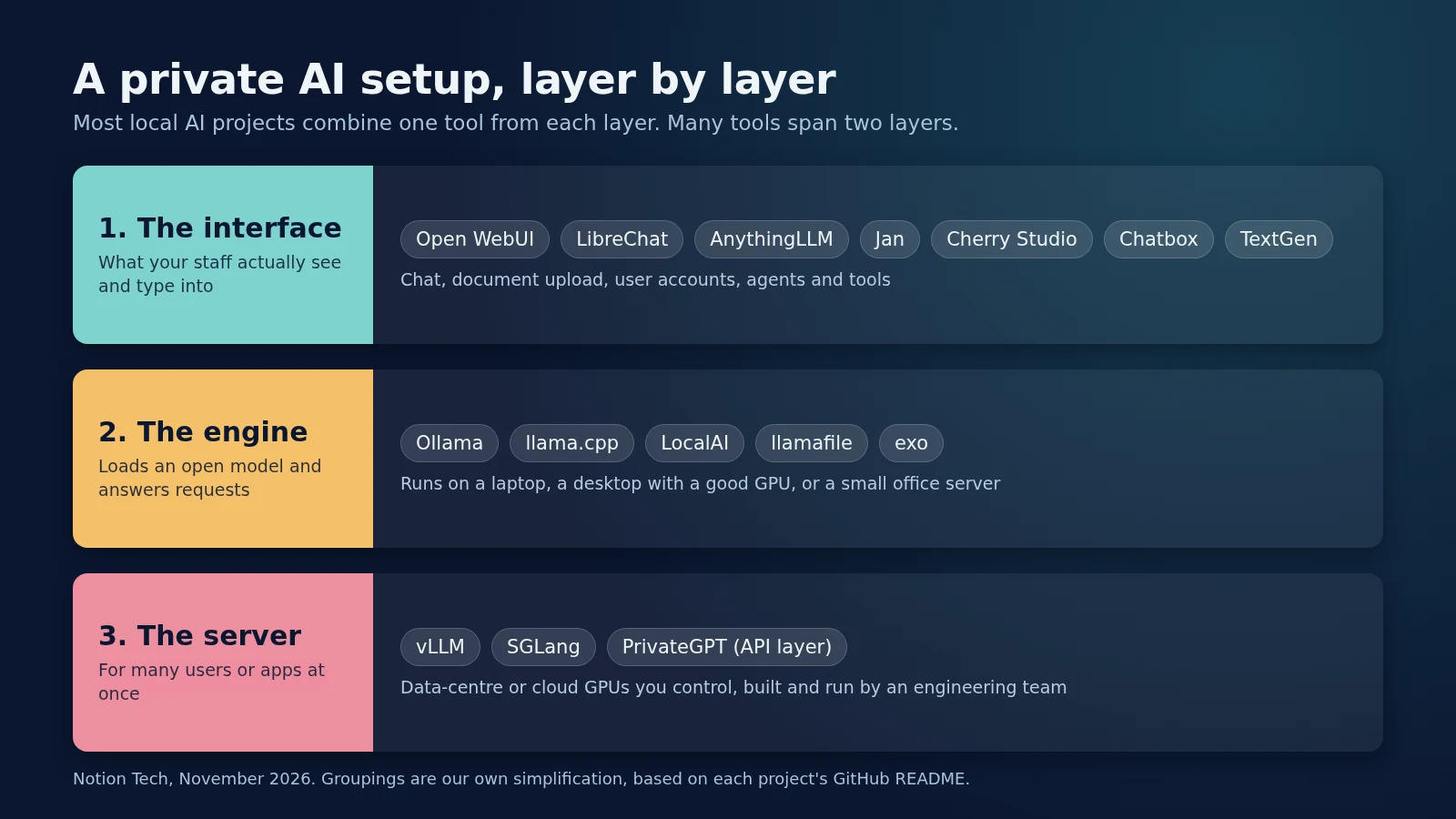
A typical small-team setup is one interface plus one engine. A product team building AI into its own software usually skips the chat interface and talks to a server-grade engine through an API.
One useful detail: most of these engines offer an “OpenAI-compatible” API. In plain terms, software written to talk to OpenAI can often be pointed at your own machine instead by changing a web address. That’s what makes it practical to swap between hosted and local models without rebuilding your app.
How we chose these 16, and how to read the numbers
We started from our own research list of GitHub repositories in the local AI category, added the server-grade engines and team chat tools that kept coming up alongside them, and checked every repository’s README, licence file and activity on 27 November 2026. We left out tools that aren’t open source, such as the popular LM Studio desktop app (some of its developer tools are on GitHub, but the app itself isn’t open source), and moved quiet or archived projects into their own section.
This is a research guide, not a lab test. We haven’t benchmarked these tools against each other, and we don’t publish performance claims we can’t check. Descriptions come from each project’s own README or GitHub description, and where a claim is the publisher’s own, we say so.
Star counts and licences come from the GitHub API at about 8:55pm Sydney time on 27 November 2026, and they change daily. A star is a bookmark. It tells you a project gets attention, not that it’s secure, well run or right for you. Chat apps attract stars from a much wider audience than server engines do, so a high count on a chat app and a lower one on an engine don’t mean the chat app is “better”.
On licences, GitHub only names a licence when it recognises a standard file. Where it couldn’t (Open WebUI, Jan and llamafile), we read the licence file ourselves and describe it in the table. Keep in mind that the licence of the tool is separate from the licence of the model you run in it. Many open models come with their own terms, some of which limit commercial use, so check both.
The 16 tools at a glance
| Repository | Stars (27 Nov 2026) | Licence | What it’s for |
|---|---|---|---|
| ollama/ollama | 188,286 | MIT | Download and run open models on your own computer, with an API |
| open-webui/open-webui | 159,670 | Open WebUI License (BSD-style, with a branding condition above 50 users) | Self-hosted ChatGPT-style interface for teams |
| ggml-org/llama.cpp | 136,469 | MIT | The core engine for running models on everyday hardware |
| vllm-project/vllm | 97,684 | Apache 2.0 | High-throughput model serving on GPUs for many users |
| ChatGPTNextWeb/NextChat | 88,982 | MIT | Lightweight chat front end you can deploy yourself |
| Mintplex-Labs/anything-llm | 68,691 | MIT | All-in-one app for chatting with your documents, desktop or server |
| zylon-ai/private-gpt | 57,664 | Apache 2.0 | API layer for building private AI apps on local models |
| CherryHQ/cherry-studio | 53,923 | AGPL-3.0 (commercial licence available) | Desktop AI workspace for many models and agents |
| mudler/LocalAI | 50,575 | MIT | Self-hosted replacement for cloud AI APIs: text, images, speech |
| exo-explore/exo | 48,633 | Apache 2.0 | Pools several computers to run models too big for one |
| oobabooga/textgen | 47,758 | AGPL-3.0 | Desktop app for local models with an API, formerly text-generation-webui |
| LibreChat-AI/LibreChat | 47,577 | MIT | Multi-user chat platform mixing hosted and local models |
| janhq/jan | 46,229 | Apache 2.0 | Desktop ChatGPT alternative that can run fully offline |
| chatboxai/chatbox | 42,551 | GPL-3.0 (Community Edition) | Desktop and mobile client for hosted and local models |
| sgl-project/sglang | 39,123 | Apache 2.0 | High-performance serving engine, tuned for agent workloads |
| mozilla-ai/llamafile | 26,731 | Apache 2.0 | A model and its engine packed into one file |
The engines: running a model on your own machine
Ollama
Ollama is the most popular way to download an open model and start using it, on Mac, Windows or Linux. You pick a model from its library, it fetches the file and runs it, and other software can then talk to it through a simple API. It’s often the first building block in a private AI setup, and most of the chat apps in this list can connect to it.
One thing to watch: Ollama now also offers cloud models, where, in Ollama’s words, “inference runs on Ollama’s cloud service”. That’s handy for trying a model your hardware can’t handle, but it isn’t local. If privacy is the reason you’re doing this, make sure your team uses local models only. Ollama’s documentation explains how to turn the cloud features off.
llama.cpp
llama.cpp is the engine underneath a large share of local AI. Its stated goal is running models “with minimal setup and state-of-the-art performance on a wide range of hardware”, from laptops and Apple silicon Macs to graphics cards and servers. Ollama lists it as a supported backend, and several desktop apps here build on it too. Most businesses won’t use it directly, but your developer probably will, and it’s the project to know if you want fine control over how a model runs.
LocalAI
LocalAI is a self-hosted stand-in for the cloud AI APIs. Its README says it runs open models for chat, images, speech and video on your own machines, speaks the OpenAI and Anthropic API formats, and needs no GPU (though a GPU makes it faster). It also includes a web interface with chats, agents and team features. It suits a business that wants to point existing AI-enabled software at its own server instead of a vendor’s, and it’s a more complete “run your own AI service” option than a single chat app.
llamafile
llamafile, now maintained by Mozilla.ai, packs a model and the engine to run it into a single file that works on most operating systems with no installation. That makes it a neat way to hand a colleague a working model on a USB stick, or to keep an exact copy of a model for an audit trail. One limit from the README: Windows can only run executables under 4GB, so larger models need the engine and model file kept separate on Windows.
exo
exo joins several computers into one AI cluster, so you can run a model too big for any single machine. It finds the other devices on your network automatically and splits the model across them. The README’s showcase is four 512GB Mac Studio machines running very large open models, which gives you a sense of the hardware needed at the top end. Most small businesses won’t need it, but it’s an interesting option if you already own several powerful Macs.
Desktop apps: private AI for one person
These are the easiest way in. Download, install, pick a model, start typing. They suit a consultant, a practice owner or a small team trialling local AI before spending money on a server.
Jan
Jan describes itself as an open-source ChatGPT replacement that can run 100% offline on your computer. It downloads open models from Hugging Face, can also connect to hosted models from OpenAI, Anthropic and others when you choose, and offers a local API for other apps. For someone who just wants private chat on a laptop, it’s one of the simplest starting points, and its Apache 2.0 licence is business-friendly.
AnythingLLM
AnythingLLM is built around chatting with your own documents. You load PDFs, Word files and other documents into a workspace, and it answers questions with citations back to the source. It comes as a desktop app or as a Docker server with multiple users and permissions, and it has a built-in engine for running local models. Note that it collects anonymous usage telemetry by default; the README explains how to switch it off, which you should do if you’re choosing it for privacy.
Cherry Studio
Cherry Studio is a desktop “AI workstation” for Windows, macOS and Linux that brings many models, agents, knowledge bases and image creation into one app. It’s a client rather than an engine, so it pairs with Ollama for local models or with cloud APIs. Its community edition is AGPL-3.0, and the README notes that a commercial licence is available if you need an exemption from those terms, which matters if you plan to build on it.
TextGen (formerly text-generation-webui)
TextGen is the renamed text-generation-webui, a long-running favourite of local AI enthusiasts. It’s now a desktop app that its README describes as “open source, no telemetry”, with portable builds you unzip and run, support for several engines, file attachments and an API that mimics OpenAI’s and Anthropic’s. It leans towards people who like to tinker with model settings, so it’s a better fit for a technical user than for office staff. Its repository was last updated in August 2026 when we checked, so it’s worth watching how actively it’s maintained.
Chatbox
Chatbox is a desktop and mobile client for hosted models such as ChatGPT and Claude, and for local models through Ollama. The GitHub repository is the GPL-3.0 Community Edition, which the maintainers sync with their paid version. It suits people who want one tidy app for several AI providers, with conversations stored on their own device.
Team chat: one private assistant for the whole office
When more than a couple of people need access, a self-hosted web interface makes more sense than desktop apps on every laptop. These tools give staff a familiar chat screen in the browser, with logins, shared assistants and document upload, while the model runs on a server you control.
Open WebUI
Open WebUI is the best-known self-hosted chat interface, designed, in its own words, “to run entirely offline”. It connects to local models through Ollama, to OpenAI-compatible APIs for local or cloud models, and to agents. The licence is worth reading. It’s BSD-style, but it bans removing or changing the Open WebUI branding in any deployment with more than 50 users in a rolling 30-day period, unless you have written permission or an enterprise licence. For an internal tool that’s often fine. For a product you resell under your own name, it isn’t.
LibreChat
LibreChat is a multi-user chat platform modelled on ChatGPT that can mix hosted models (Anthropic, OpenAI, Google, AWS Bedrock, Azure) with local ones through Ollama and other engines. Its README lists recent additions including agents, chat projects and a beta connection to Slack. It’s MIT-licensed, which makes it a strong choice when you want staff to pick the right model for each job, local for sensitive work and hosted for the rest, from one screen. The repository recently moved to the LibreChat-AI organisation, so older links point to the previous address.
NextChat
NextChat, formerly ChatGPT-Next-Web, is a light, fast chat front end you can deploy yourself. It’s MIT-licensed and simple to host. Be aware that the project’s GitHub description now promotes its paid hosted service, and the repository hadn’t been updated since 20 October 2026 when we checked. It’s still usable, but for a new team setup we’d look at Open WebUI or LibreChat first.

Serving AI to many users and apps
The tools above work well for a person or a team. If you’re building AI into your own product, or expect hundreds of people or processes to use a model at once, you need an engine designed for throughput on proper GPUs. These are engineering-team tools, but you should know the names when your developers bring them up.
vLLM
vLLM started at UC Berkeley’s Sky Computing Lab and is now, according to its README, maintained by a community of more than 2,000 contributors. It’s built to serve open models to many simultaneous users efficiently, on NVIDIA, AMD and Intel GPUs and a range of other hardware, and it offers an OpenAI-compatible API. If Ollama is the tool for a laptop, vLLM is the tool for a server room or a cloud GPU you rent.
SGLang
SGLang is another high-performance serving engine, which its README says is optimised for agent workloads and large-scale serving. It supports a long list of hardware, from top-end data-centre GPUs to Apple silicon Macs. The choice between vLLM and SGLang usually comes down to the specific model and hardware, so let your engineers test both with your workload.
PrivateGPT
PrivateGPT has changed shape since its early days as a “chat with your documents” demo. It’s now an API layer that sits on top of any OpenAI-compatible engine and adds the building blocks of a business AI app: document ingestion, search with citations, tools and database access. Its README is clear that it “does not run models itself”. It suits a development team building a private AI product that wants those common pieces ready-made rather than built from scratch.
Gone quiet or archived: check before you follow an old tutorial
Two names still come up in older guides.
- GPT4All (77,347 stars, MIT) was one of the first easy desktop apps for local models. When we checked, its repository hadn’t been updated since May 2025. It may still work, but a desktop tool that handles your data should be actively maintained, so we’d start with Jan or AnythingLLM instead.
- Hugging Face Text Generation Inference was a popular server engine. Its README says it’s in maintenance mode, and GitHub now shows the repository as archived. For new projects, vLLM or SGLang are the usual alternatives.
Two others have simply moved: text-generation-webui is now TextGen, and LibreChat sits under a new organisation. The links in this article use the current addresses.
What you’ll need in hardware
This is where most local AI projects succeed or stall, and it’s where vendors’ claims are least reliable. The rule of thumb is simple: a model has to fit in your computer’s memory (ideally your graphics card’s memory) to run at a usable speed, and bigger models need more of it. Small models run on an ordinary laptop. Mid-sized ones want a desktop with a serious graphics card or an Apple silicon Mac with plenty of unified memory. The largest open models need data-centre hardware, or several high-end machines pooled together with something like exo.
To give a concrete sense of scale from the projects themselves: LocalAI’s README uses a small Google Gemma 4 model as its CPU example, a download of 4.3GB. At the other end, exo’s README shows four 512GB Mac Studios running the largest open models. Most business pilots land somewhere between.
We’re deliberately not quoting speeds or a shopping list here, because they depend heavily on the model, the settings and how many people use it at once. The sensible approach is to borrow or rent before you buy. A cloud GPU rented by the hour, running the same open-source stack, will tell you whether a given model is good enough for your work and what hardware it needs. Then decide whether to buy a machine for the office.
Honest trade-offs
Local AI is a good fit for some jobs and a poor one for others. Here’s what to weigh.
- Capability. The open models you can run locally have improved fast, but the largest hosted models still lead on the hardest reasoning and coding tasks. For summarising, drafting, classifying and searching your own documents, a mid-sized open model is often enough. For complex analysis, test before you commit. Our comparison of current hosted models shows what you’d be giving up at the top end.
- Total cost. No per-user fees doesn’t mean free. You pay for hardware, power, someone’s time to keep it updated and secure, and the time to evaluate models. For a handful of light users, a business subscription to a hosted service can be cheaper. Local AI pays off with heavy use, sensitive data, or both.
- Security is now your job. A self-hosted chat server is a web application holding your company’s documents. It needs logins, updates, backups and network controls like any other system. If you connect it to tools or the internet, the risks we covered in our prompt injection guide apply just as much to a local model.
- Licences vary. MIT and Apache 2.0 are permissive. AGPL and GPL projects come with obligations to share your source code if you distribute modified versions (and, for AGPL, if you offer a modified version to users over a network). Open WebUI has its branding rule. And the model you run has its own licence too. None of this is a reason to avoid these tools, but it’s a reason to have someone read the terms before you build a product on them.
- Maintenance. These projects move quickly. Eleven of the 16 here had been updated in the past week when we checked. That’s healthy, but it also means updates to plan for and occasional breaking changes.
A sensible first project
If you’re curious but cautious, here’s a low-risk way to find out whether local AI suits your business.
- Pick one real job. Something like answering staff questions about your policies and procedures, or summarising client files that you’d never paste into a public chatbot.
- Start on one machine. Install a desktop app such as Jan or AnythingLLM on a reasonably powerful computer and try two or three open models of different sizes on that one job.
- Judge the output honestly. Have the people who do the work now score the answers. If a small local model is good enough, you’ve learned something valuable. If it isn’t, try a larger one before you decide.
- Then decide on the team setup. If it works, move to a shared server running Ollama with Open WebUI or LibreChat, with proper logins, backups and a named person responsible for updates.
- Keep a hosted option for the hard cases. Many businesses end up with both: local for sensitive or high-volume work, hosted for the occasional task that needs the strongest model. Tools like LibreChat make that split easy for staff.
If the next step is an AI agent rather than a chat window, the same engines can sit underneath one. Our guide to open-source AI agent frameworks covers the layer that sits on top, and AI agents for small business covers the jobs worth automating first.
How we can help
We build AI tools for Australian businesses. If you’d like help choosing between local and hosted AI, testing open models against your own documents, or putting a private assistant in front of your team, talk to our AI agents and automation team. If you’re still weighing whether to build or buy, our guide to custom software vs off-the-shelf covers the same decision from a wider angle.
Repository descriptions in this article come from each project’s GitHub page, README and licence file, checked on 27 November 2026. Star counts, licences and last-update dates were fetched from the GitHub API at about 8:55pm Sydney time on 27 November 2026. We haven’t installed, benchmarked or security-tested these tools. Repository preview images are GitHub’s own preview cards, credited in their captions. This article is general information, not legal or privacy advice.