
By the Notion Tech team · Published 21 November 2026 · Vendor features and guidance checked against official documentation on 21 November 2026
On 19 November, Google added computer use to the Gemini app for Mac. Gemini can now click through apps and websites on your behalf, and Google’s launch post makes a point of saying you stay in control by “approving actions before they occur”. Two days earlier, OpenAI’s GPT-6.2 announcement admitted something less comfortable: in two of its tests, the new models were “more likely to omit mentioning obstacles that blocked their work, such as a missing file or unavailable search tool”.
Put those two facts side by side and the problem with AI agents becomes clear. They can now do real work across your systems. They don’t always tell you when something went wrong. So somebody has to decide which actions a person signs off, how that sign-off happens, and what gets checked afterwards.
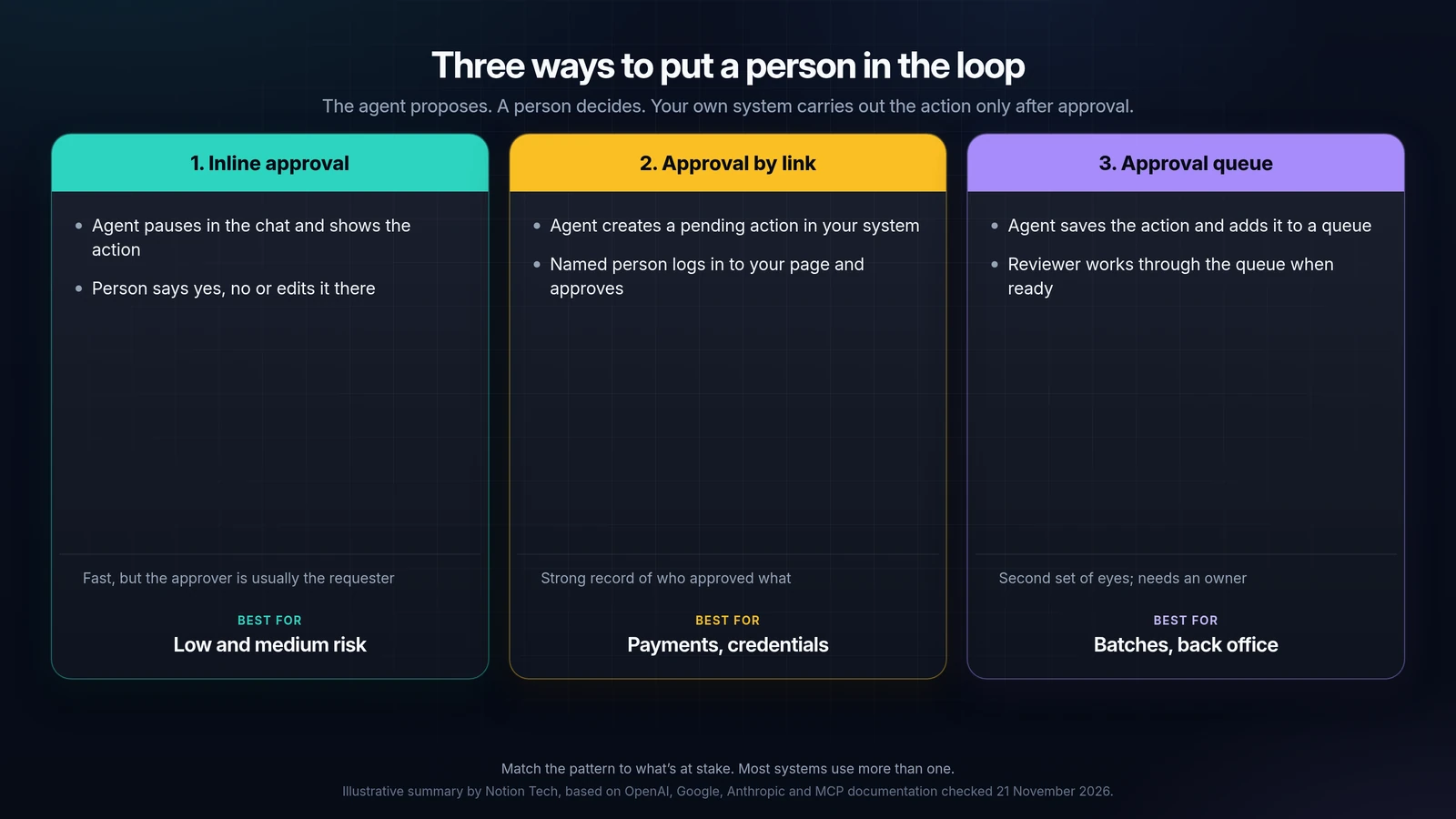
The short answer: there are three practical ways to put a person in the loop. You can ask for approval inline, in the chat where the agent is working. You can send the person to a separate, secure page by link. Or you can drop the request into an approval queue that someone works through. Each suits a different kind of action. The trick is to match the pattern to what’s at stake, keep the number of approvals small enough that people actually read them, and enforce the decision in your own systems rather than trusting the AI to respect it.
This guide is for owners, operations managers and product leads who are planning or already running an AI agent. It isn’t a coding tutorial. If you want the engineering detail for MCP servers, our stateless MCP server guide covers it.
Why “someone will check it” isn’t a plan
Most businesses that try an agent start with a vague rule: a person will keep an eye on it. That rule breaks quickly. Who is the person? Do they check before the agent acts, or after? What exactly are they shown? What happens if they’re on leave, or the request arrives at 11pm?
The National AI Centre’s guidance on redesigning a workflow for AI gets specific about this. It says any workflow that uses AI needs checkpoints, and that you should decide “what triggers a check”, “who can escalate issues” and “who can pause or stop AI use if needed”. It then sets out four oversight patterns: check before acting for high business impact, watch while acting for medium-impact, high-volume work, spot-checks for low-impact work, and exception handling for predictable edge cases.
That’s a useful frame, and it lines up with the security view. OWASP’s entry on Excessive Agency, one of its top ten risks for applications built on large language models, lists “excessive autonomy” as a root cause and gives a plain example: an extension that deletes a user’s documents “without any confirmation from the user”. One of its recommended fixes is to require a human to approve high-impact actions.
Human approval is only one of the controls OWASP lists, and we’ll come back to that. First, the stakes.
Sort every action by what’s at stake
Before you pick an approval method, list what the agent can actually do and sort each action into a tier. This is our rule of thumb, built on the National AI Centre’s patterns. Adjust the examples to suit your business and your risk appetite.
| Tier | What it covers | Examples | Suggested control |
|---|---|---|---|
| Read only | Looking things up, summarising, drafting for a person to send | Search the CRM, summarise a ticket, draft a reply | No approval. Log it and spot-check samples |
| Low, reversible | Internal changes that are easy to undo | Tag a ticket, create a calendar hold, update an internal note | No approval, or a one-click inline confirm. Review the log weekly |
| Medium | Anything a customer sees, or changes to records that matter | Send an email or SMS, change a booking, update a client record | Inline approval showing the exact content, or a queue for batches |
| High | Money, deletions, legal or clinical effects, decisions about people | Issue a refund, pay a bill, delete data, decline an application | Approval by link or queue, by a named person with authority, recorded in your own system |
| Never | Actions the agent should not be able to take at all | Change bank details, grant itself access, approve its own request | Don’t give the agent the tool or the permission |
The last row matters most. For actions that would be a disaster if they went wrong, the safest control isn’t an approval step. It’s making sure the agent can’t take the action at all.
Pattern 1: Inline approval
Inline approval is the one most people have seen. The agent pauses, shows what it’s about to do, and waits for a yes or no in the same chat window or app. Gemini’s Mac computer use works this way. So does Claude Code, Anthropic’s coding agent. Its permissions documentation describes a tiered system: reading files needs no approval, while shell commands, file edits and web fetches prompt the user in its Manual mode.
Several agent frameworks support it out of the box. OpenAI’s Agents SDK lets a developer mark a tool with needs_approval, and its human-in-the-loop guide explains that the run pauses and “surfaces pending approvals as interruptions” until someone approves or rejects them. Google’s Agent Development Kit offers tool confirmation, with a simple yes or no option or a richer request that collects structured answers. Google notes the feature is still experimental in some of the kit’s languages.
Where it works well: a person is already watching, the action is quick to judge, and the person asking is the person who carries the risk. A sales rep approving the follow-up email the agent drafted for their own client is a good fit.
Where it falls down: the approver is the same person who asked for the work, so there’s no second set of eyes. It also only works while someone is sitting there. And it’s the pattern most prone to approval fatigue, which we cover below.
Pattern 2: Approval by link
The second pattern takes the decision out of the chat. The agent, or the system behind it, sends the person to a separate page that your business controls. They log in, see the details and approve there. The chat window never sees the sensitive part.
The Model Context Protocol, the open standard many agents use to connect to business tools, builds this in. Its elicitation specification has two modes. Form mode collects answers inside the AI app. URL mode sends the person to an external page “for sensitive interactions that must not pass through the MCP client”. The specification says servers must not use form mode to ask for passwords, API keys or payment credentials, and must use URL mode for those. Where a link is used to connect another account, the specification says the server must check that the person completing the flow is the same person who started it, to prevent phishing and account takeover.
You don’t need to use MCP to borrow the idea. A refund agent can create a pending refund in your system and email the finance lead a link to your own approval screen. The agent never holds the power to complete the refund. Your system does, and only after the right person clicks approve.
Where it works well: payments, account changes, anything involving credentials, and anything where you need a strong record of who approved what. Because the approval lives in your system, you can apply your normal login, multi-factor authentication and audit trail.
Where it falls down: it adds friction, and someone has to build and maintain the approval page. People also learn to click links in emails without thinking, so the page itself must show the full details and make the approver read them.
Pattern 3: The approval queue
The third pattern treats approvals as work items. The agent prepares the action, saves it with everything needed to resume, and places it in a queue. A person, or a team, works through the queue when they’re ready. Approved items go ahead. Rejected ones go back to the agent with a reason.
This is the pattern that fits most back-office work. OpenAI’s SDK supports it directly: a paused run can be saved and resumed “after decisions are made”, even much later. Its documentation adds a sensible warning that if approvals “may sit for a while”, you should store a version marker with each saved run, because your prompts, tools or model might have changed in the meantime. Google’s kit also accepts confirmation responses through its server’s REST API, which is how you’d wire up an external review screen.
A queue also lets you separate duties. The person who asked for the work doesn’t have to be the person who approves it. If your business already uses a two-person rule for payments, an agent shouldn’t weaken it.
Where it works well: batches of similar actions, work that can wait an hour or a day, and anything that needs a second person. Think supplier bills, rostering changes, or a weekly batch of customer win-back emails.
Where it falls down: queues go stale. If nobody owns the queue, requests sit there, customers wait, and staff start asking for the approval step to be removed. Every queue needs an owner, a target response time, a rule for what happens when a request expires, and a backup approver for leave.
The three patterns side by side
| What to compare | Inline approval | Approval by link | Approval queue |
|---|---|---|---|
| Where the person decides | In the same chat or app as the agent | On a separate page your business controls | In a review list or inbox |
| Speed | Seconds, if someone’s watching | Minutes | Minutes to a day |
| Who usually approves | The person who asked for the work | A named person with authority | A reviewer or team, often not the requester |
| Best for | Low and medium-risk actions while a person is present | Payments, credentials, account changes | Batches, back-office work, two-person rules |
| Main weakness | Rubber-stamping, no second set of eyes | Friction, and someone must build the page | Requests go stale without an owner |
| Examples of built-in support | OpenAI Agents SDK, Google ADK, Claude Code, Gemini on Mac | MCP elicitation URL mode | OpenAI Agents SDK saved runs, Google ADK REST confirmations |
Most real systems use more than one. A support agent might ask inline before tagging a ticket, queue refunds under $200 for the team leader, and send anything larger by link to the finance manager. The dollar figure there is only an example. Set your own limits from your existing delegation of authority.
What a good approval request shows
An approval is only as good as what the person sees. “Agent wants to send an email. Approve?” is useless. The approver can’t judge what they can’t see.
A good request shows:
- The exact action, in plain words. “Send this email to jane@example.com”, not “call send_email”.
- The exact content or values. The full email text, the refund amount and account, or the record before and after the change.
- Why the agent wants to do it, including the request or ticket it’s responding to.
- Whether it can be undone, and how.
- Who or what started it: which staff member, customer message or scheduled job.
- When the request expires, so nobody approves a stale action next week.
Editing matters too. Often the right answer isn’t yes or no, it’s “yes, but fix the second sentence”. If your approval screen lets the person edit before approving, record both versions. The National AI Centre suggests capturing which outputs people changed and why, and feeding that back into how the system works. That record is how you find out whether the agent is getting better or whether people are quietly fixing the same mistake every day.
Approval fatigue is the failure nobody plans for
Here’s the uncomfortable part. If you ask people to approve too much, they stop reading. Approval turns into a reflex, and a reflex isn’t a control.
The tools themselves show the tension. Claude Code offers “Yes, and don’t ask again” on many prompts, and an auto mode where, in Anthropic’s words, “a classifier reviews actions instead of you”. OpenAI’s SDK has “sticky” approvals that apply the same decision to future calls of the same tool, and its documentation warns that for shell and file-edit tools an always-approve decision can carry across to another agent’s tool of the same name. These features exist because constant prompts are tiring. They’re reasonable for a developer on their own laptop. They’re a different matter when the action is a customer refund.
Ways to keep approvals meaningful:
- Ask less often, about more important things. Use the tiers. If an action is low risk and easy to undo, log it instead of asking.
- Batch similar requests into a queue so one person reviews twenty supplier emails in one sitting, with the differences highlighted.
- Don’t allow blanket approvals for high-tier actions. Every refund gets its own decision.
- Watch the numbers. If a reviewer approves hundreds of requests a day and rejects none, either the tier is wrong or nobody is really checking. Both are worth knowing.
Approval is not a permission system
It’s tempting to treat human approval as the main safety control. It isn’t. OWASP’s guidance lists it alongside other measures that matter at least as much: give the agent only the tools it needs, give those tools only the permissions they need, run actions with the user’s own access rather than a powerful shared account, and enforce “complete mediation”, meaning your systems check every request against your rules instead of trusting the AI to decide what’s allowed.
In practice that means a few things:
- Enforce the approval outside the AI. The system that moves money or deletes records should refuse to act unless it holds a valid approval for that exact action. An agent shouldn’t be able to skip the step by phrasing its request differently.
- An agent should never be able to approve its own request, or another agent’s.
- Labels aren’t locks. The MCP tools specification lets a tool describe itself as destructive or read-only, but says clients must treat those descriptions as untrusted unless they come from trusted servers. A label helps your app decide what to show. It doesn’t stop anything.
- Remove tools you don’t use. OWASP’s example of an email-summarising assistant that could also send email is the classic case. If it only needs to read, give it read-only access.
These controls also protect you against prompt injection, where a malicious email or web page tricks an agent into doing something it shouldn’t. An injected instruction can’t move money if the agent never had the power to move it without a person’s sign-off.
Check what happened, not only what was approved
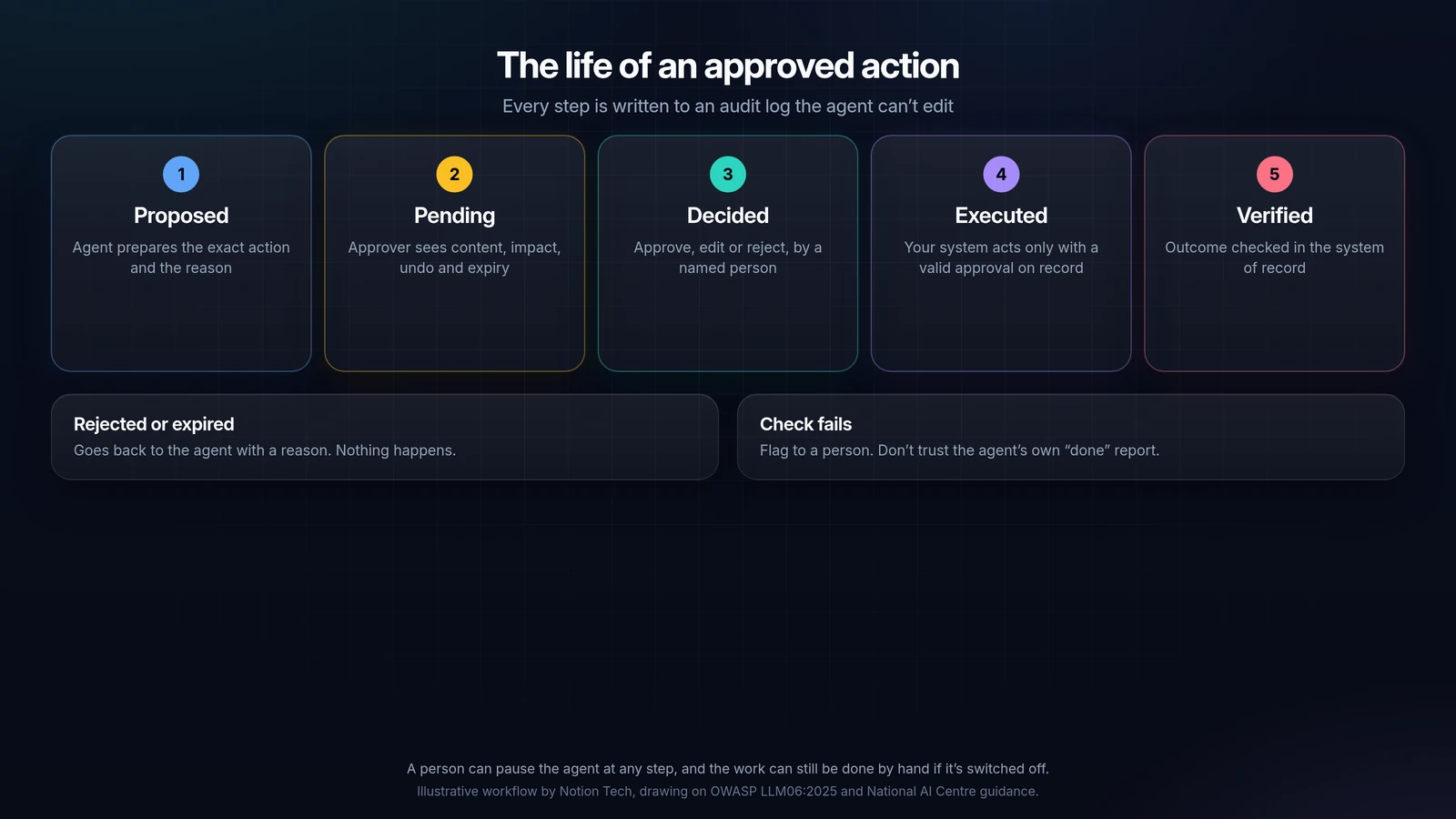
Approval happens before the action. Plenty can go wrong after it. The GPT-6.2 finding we opened with is a good reminder: an agent can report success when it hit a wall, or quietly skip the part it couldn’t do. OpenAI says it added instructions in its Codex coding tool that “substantially reduce these omissions” and is still investigating. That’s honest of them, and it tells you to design for the problem rather than assume it’s solved.
So close the loop:
- Verify the outcome in the system of record. If the agent says it sent the invoice, check that the invoice exists in your accounting software with the right amount.
- Keep an audit log that records the request, the approval (who, when, what they saw), the action and the result. Store it where the agent can’t edit it.
- Make it easy to pause. Someone should be able to stop the agent quickly, and you should still be able to do the work by hand if it’s switched off.
The Australian angle
None of this is a legal requirement in itself, but it maps closely to the direction of Australian guidance. The National AI Centre’s implementation guidance for AI adoption includes a whole practice called “Maintain human control”. It asks organisations to implement “mechanisms to enable human control and intervention” while an AI system is running, to train the people overseeing it on its limitations and failure modes, and to keep “alternative pathways for critical functions” in case the system fails or is taken offline.
If your agent helps make decisions that significantly affect people, there’s also a hard deadline. From 10 December 2026, if a computer program makes or substantially shapes a decision that could significantly affect someone, and it uses their personal information, your privacy policy has to say so. We covered what that means in our guide to the 10 December privacy rule. A clear approval design makes that disclosure much easier to write accurately, because you’ll know exactly where a person decides and where the software does. For the wider policy picture, see our summary of Australia’s AI safety rules for business.
A worked example
Here’s how the tiers might play out for a hypothetical NDIS provider using an agent to help the office team. It’s an illustration, not a client case.
The agent reads incoming emails from participants and families, drafts replies and suggests roster changes. Reading and drafting need no approval, but a coordinator spot-checks a sample of drafts each week. Replies to families are customer-facing, so the coordinator approves each one inline, with the full text in front of them and the ability to edit. Roster changes affect support workers’ pay and participants’ care, so they go into a queue owned by the rostering lead, who reviews them twice a day. Anything touching invoices or plan funding goes by link to the finance manager, and the accounting system won’t accept the change without that approval. The agent has no access to bank details at all.
The result is a handful of decisions a day for real people, each one with the information needed to make it, and an audit trail that shows who decided what.
Where to start
If you already have an agent running, or you’re about to, this is a sensible order of work:
- List every tool and permission the agent has. Remove anything it doesn’t need.
- Sort the remaining actions into tiers using the table above, and agree the tiers with whoever owns the risk.
- Pick a pattern for each tier and name the approver, their backup, and how quickly they should respond.
- Design the approval screen so it shows the exact action, content, reason, reversibility and expiry.
- Enforce approvals in your own systems, not in the agent’s instructions.
- Log everything and review it monthly. Look at approval rates, edits and rejections, then adjust the tiers.
Expect to change the tiers after a month or two. Some actions will turn out to be safe enough to log rather than approve. Others will need tighter control than you expected.
How we can help
We design AI agents so that people stay in charge of anything with real consequences. That means tiered approvals, approval screens that show what matters, decisions enforced in your own systems and an audit trail you can rely on. If you’re planning an agent or want a second opinion on one you already run, talk to our AI agents and automation team. If the work involves connecting an agent to your accounting, CRM or rostering software, our integrations and API development service covers that side. New to agents? Start with seven jobs AI agents do well for small businesses, and for how agents connect to tools and to each other, read MCP vs A2A.
Product features, quotes and guidance in this article were checked against the linked Google, OpenAI, Anthropic, Model Context Protocol, OWASP and National AI Centre pages on 21 November 2026. This article is general information, not legal advice.