
By the Notion Tech team · Published 26 November 2026 · API prices checked on the OpenAI, Anthropic and Google pricing pages on 26 November 2026
“What will it cost to run?” is usually the second question we get about an AI agent, right after “can it do the job?” It’s also one that proposals often answer badly, with a line like “AI usage: approximately $X per month” and no working behind it, or a price per million tokens that means nothing to the person approving the budget.
The honest answer is that it depends on four things you can actually measure: how many tasks the agent handles, how many times it calls the model for each task, how much text goes in and out on every call, and which model it uses. Get those down on paper and the running cost stops being a mystery. Get them wrong, especially the second one, and a cheap pilot can turn into an expensive surprise.
This guide builds a running-cost model from the ground up, using list prices published by OpenAI, Anthropic and Google, checked on 26 November 2026. It’s written for founders, operations managers and anyone signing off on an agent project. There’s no code, just arithmetic you can check. In our guide to AI agents for small business we said running costs should be estimated from your real numbers. This is how to do that.
The short answer: for a typical business task handled by a mid-priced model, the token bill is often a few cents per task, and prompt caching can cut it by more than half. The bigger risks are agents that loop more than expected, premium models used for routine work, and the costs that sit outside the token bill entirely. A small pilot that records real token counts beats any estimate, including ours.
Why agents cost more than chatbots
A chatbot answers a question with one call to the model. You send the question, you get the answer, you pay for both. An agent works differently. It reads a request, decides what to do, calls a tool (your CRM, an order system, a search), reads the result, then calls the model again to decide the next step. A single customer email might take five, ten or twenty model calls before the job is done.
Two things make that expensive. First, every call is billed separately. Second, each call usually carries the whole conversation so far. The model doesn’t remember the previous call on its own, so the agent sends its instructions, its tool list, the original request and every earlier step again, every time. By the fifth call, the model is re-reading everything from calls one to four.
That’s why a token price that looks tiny on a pricing page can still add up. It’s also why the most useful number for budgeting isn’t price per token. It’s cost per finished task, a point we made in our round-up of GPT-6.2 and Gemini 4 Neon, and the one this whole article is built around.
Tokens in plain English
AI providers charge by the token, a chunk of text that’s often part of a word. Prices are quoted per million tokens, in US dollars. Three kinds of token matter for agents:
- Input tokens. Everything you send the model: instructions, tool definitions, the customer’s message, documents, and the results of earlier tool calls.
- Output tokens. What the model writes back. Output costs several times more than input, five times more for every model in the table below.
- Cached input tokens. Input the provider has seen recently and can reuse. These are billed at a steep discount, which is where most of the savings in this article come from.
There’s a hidden fourth category. Reasoning models think before they answer, and that thinking is billed. Google’s pricing page says its output price includes thinking tokens, and that it also bills the internal instructions it adds when tools are used. Anthropic’s pricing page lists a tool-use system prompt that’s added to every request with tools, 286 tokens on Claude Sonnet 5.5. These are small amounts, but they arrive on every call.
One more catch: tokens aren’t the same size across providers. Each model family splits text in its own way. Anthropic’s pricing page says Claude 4.7 and later models use a newer tokeniser that produces approximately 30% more tokens for the same text than earlier Claude models. So the same email can count as a different number of tokens on different models, and identical prices per token don’t always mean identical bills.
What the main models cost today
Here are the list prices for the models most businesses are choosing between right now. We’ve taken them from each vendor’s developer pricing page on 26 November 2026. They’re standard rates in US dollars per million tokens, before any taxes, negotiated discounts or data residency uplifts.
| Model | Input | Cached input | Output | Notes |
|---|---|---|---|---|
| GPT-6.2 Astra (OpenAI) | $8.00 | $0.40 | $40.00 | OpenAI’s top model; higher rates apply to very long prompts |
| GPT-6.2 Sol (OpenAI) | $2.00 | $0.10 | $10.00 | Everyday model for coding and agents |
| GPT-6 Luna (OpenAI) | $0.10 | $0.01 | $0.50 | Lowest-priced GPT-6 model on OpenAI’s price list |
| Claude Opus 5.5 (Anthropic) | $4.00 | $0.20 | $20.00 | Anthropic’s suggested starting point for most workloads |
| Claude Sonnet 5.5 (Anthropic) | $2.00 | $0.10 | $10.00 | Mid-tier; cache hits at 0.05x the input price |
| Claude Haiku 5.5 (Anthropic) | $0.10 | $0.01 | $0.50 | Prompts up to 100,000 tokens; $0.50 / $2.50 above that |
| Gemini 4 Carbon (Google) | $2.00, then $4.00 | $0.10, then $0.20 | $10.00, then $20.00 | Prices double from 1 December 2026 |
| Gemini 4 Neon (Google) | $3.00 | $0.15 | $15.00 | Mid-tier; implicit caching only |
| Gemini 4 Hydrogen (Google) | $1.50 | $0.075 | $7.50 | Fast everyday model; also has a free tier |
A few things jump out. GPT-6.2 Sol and Claude Sonnet 5.5 have the same list prices. The smallest models (GPT-6 Luna and Claude Haiku 5.5) cost about one-twentieth of the mid-tier ones. And prices move: Google’s page shows Gemini 4 Carbon doubling on 1 December 2026, and Gemini 3.8 Flash doubling on 1 January 2027. Any cost model you build needs a date on it.
The table also leaves out the cost of writing to the cache. Anthropic charges 1.25 times the normal input price to store a prompt in its five-minute cache and twice the price for its one-hour cache. OpenAI lists separate cache-write rates too (for GPT-6.2 Sol, $2.50 for a 30-minute write). Google’s Gemini 4 models use implicit caching only, so there’s no separate write step to manage, but you also can’t force a cache hit.
A worked example: an email agent for 2,000 enquiries a month
Let’s put numbers on a realistic job. Picture an agent that handles customer enquiries for a business that gets 2,000 of them a month. For each email it reads the message, looks up the customer, checks the order system, checks the relevant policy and drafts a reply for a staff member to approve.
These are our assumptions. They’re illustrative, not measurements from a real client, and your numbers will differ:
- Five model calls per enquiry. One for each step above.
- A 6,000-token fixed prefix. The agent’s instructions, its tool definitions and a short policy summary. This is identical on every call.
- A 1,000-token customer email. Roughly a long-ish email with a signature and a quoted earlier message.
- 1,500 tokens back from each tool. A customer record, an order history, a policy extract.
- 500 output tokens per call. Including any reasoning. A model set to think harder could produce several times this.
Add it up and one enquiry uses 55,000 input tokens and 2,500 output tokens. Most of that input is repetition. The first call sends 7,000 tokens; the fifth sends 15,000, because it carries everything from calls one to four.
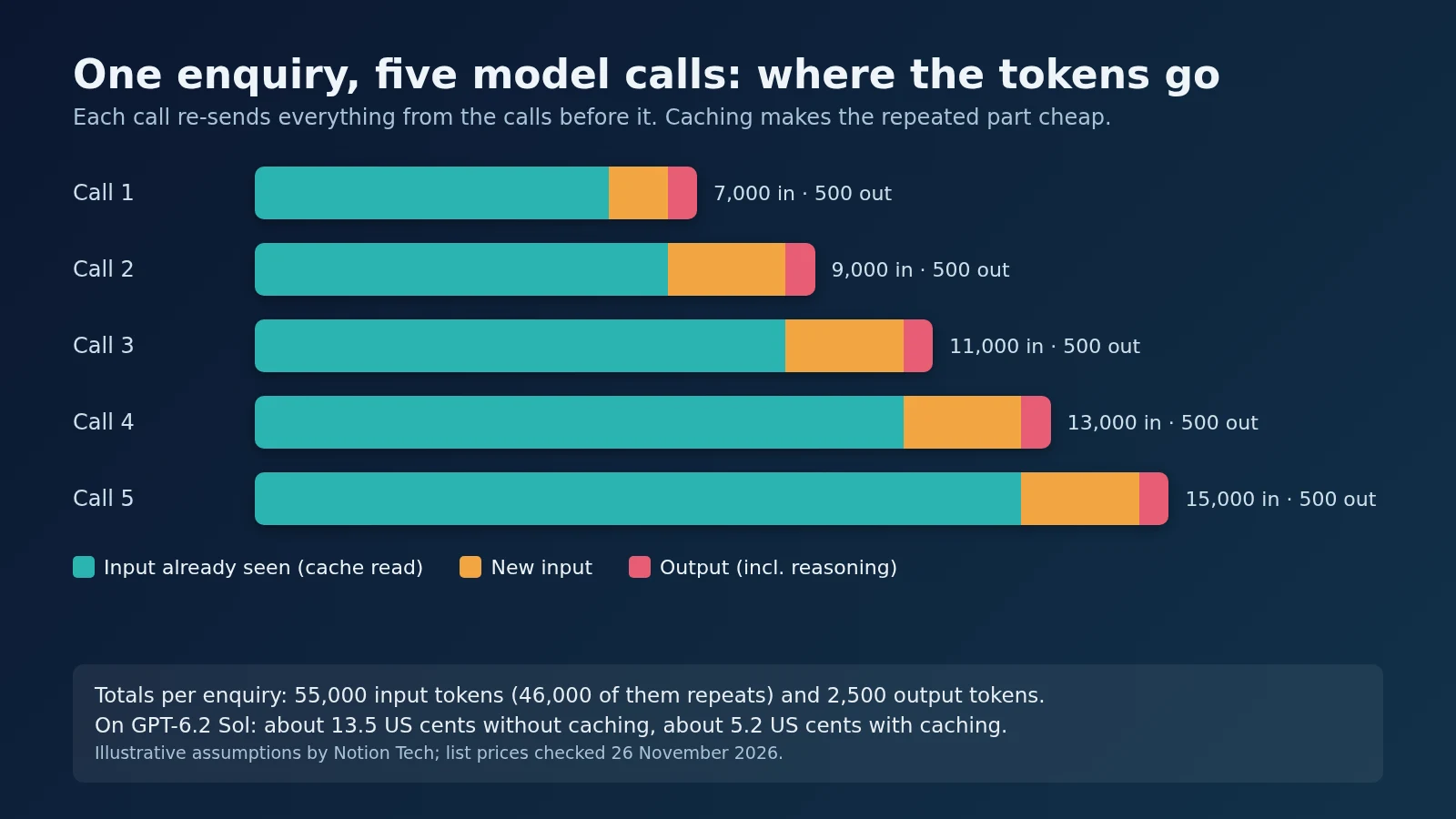
On GPT-6.2 Sol without caching, that’s 55,000 input tokens at $2 per million (11 US cents) plus 2,500 output tokens at $10 per million (2.5 cents), so about 13.5 US cents per enquiry. Multiply by 2,000 and you get US$270 a month, or roughly A$406.
Now turn on caching. On each call, everything the model saw in the previous call is already in the cache, and the fixed prefix is cached from earlier enquiries. In our model that makes 46,000 of the 55,000 input tokens cache reads at $0.10 per million. The 9,000 new tokens are billed at the cache-write rate, which we’ve used to stay on the cautious side. The cost per enquiry drops to about 5.2 US cents, and the monthly bill to about A$157. That’s a 61% saving with no change to what the agent does.
Here’s the same calculation across the models in the price table. We’ve converted to Australian dollars at the Reserve Bank’s rate of US$0.6644 per A$1 on 26 November 2026.
| Model | Per enquiry, no caching (US cents) | Per enquiry, with caching (US cents) | 2,000 a month, no caching (A$) | 2,000 a month, with caching (A$) |
|---|---|---|---|---|
| GPT-6.2 Astra | 54.0 | 20.8 | 1,626 | 627 |
| GPT-6.2 Sol | 13.5 | 5.2 | 406 | 157 |
| GPT-6 Luna | 0.7 | 0.3 | 20 | 9 |
| Claude Opus 5.5 | 27.0 | 10.4 | 813 | 314 |
| Claude Sonnet 5.5 | 13.5 | 5.2 | 406 | 157 |
| Claude Haiku 5.5 | 0.7 | 0.3 | 20 | 9 |
| Gemini 4 Carbon (from 1 Dec) | 27.0 | 9.5 | 813 | 287 |
| Gemini 4 Neon | 20.3 | 7.1 | 610 | 215 |
| Gemini 4 Hydrogen | 10.1 | 3.6 | 305 | 107 |
These are estimates from a model, not quotes. For Google we’ve assumed implicit caching hits as often as explicit caching would, which Google doesn’t guarantee. For OpenAI and Anthropic we’ve charged new tokens at the cache-write rate, which may overstate their cost slightly. And we haven’t adjusted for the tokeniser differences mentioned earlier, so read the table as a guide to the size of the bill rather than a ranking of providers.
What the table does show clearly is the spread. The same job costs about A$9 a month on the smallest models and more than A$600 on the most expensive one. Whether the small model can actually do the job well enough is a separate question, and it’s the one that matters most.
The five levers that cut the bill
Once you know where the tokens go, the ways to reduce them are fairly obvious. Here are the five we look at first, roughly in order of how much they usually help.
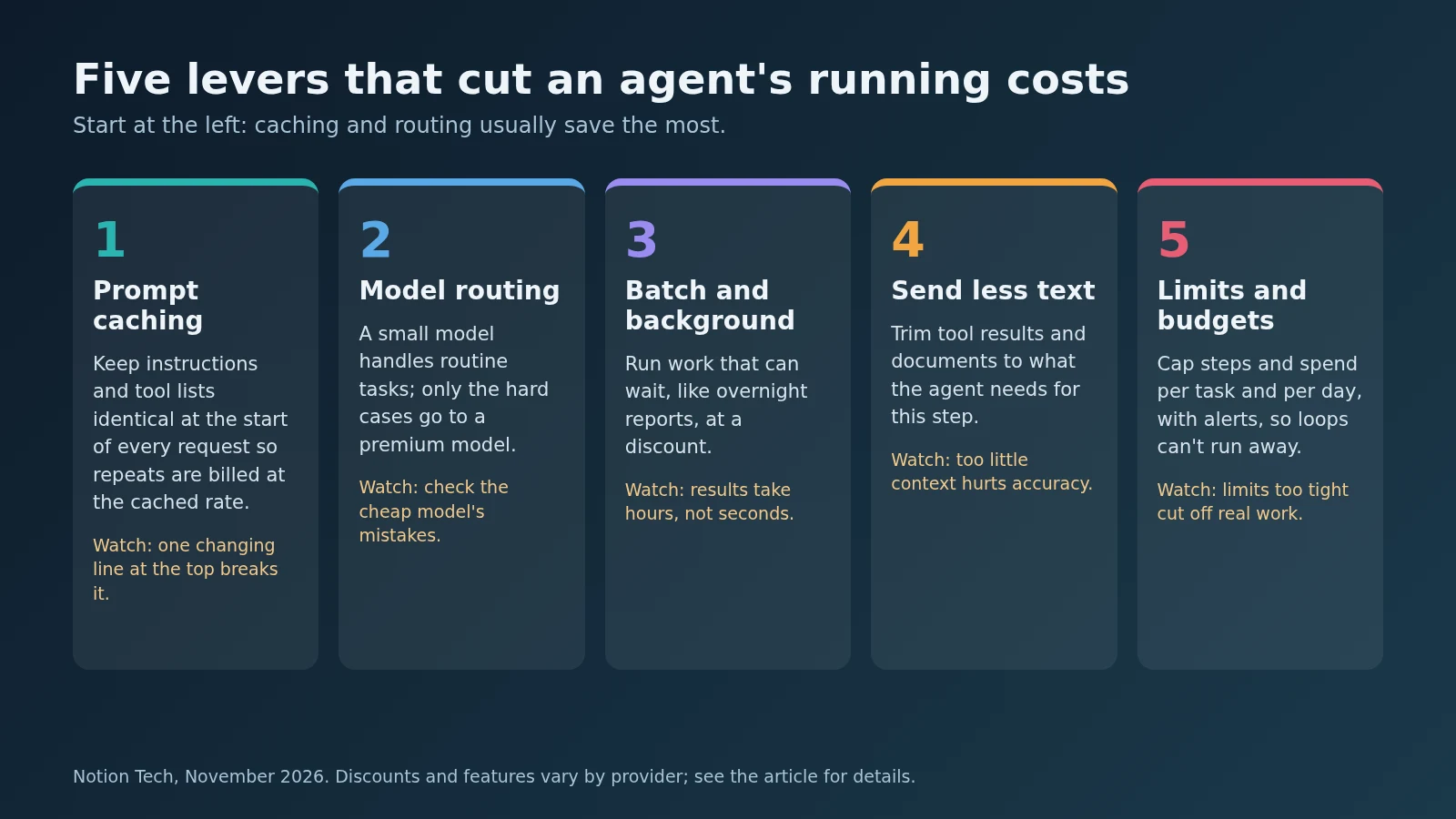
1. Prompt caching
Caching is the biggest single saving for most agents, because agents repeat themselves so much. All three providers offer caching that needs little or no set-up. OpenAI says prompt caching is on by default for supported models and that cached input is discounted by up to 95%. Anthropic offers automatic caching with a single setting, plus manual control. Google’s Gemini 4 models cache implicitly.
The catch is that caching only works on an identical prefix. OpenAI’s documentation says cache reuse requires the entire prefix to match, and that changing things like the tool list, the model or the reasoning settings can stop a request from reusing the cache. In practice that means putting the parts that never change (instructions, tool definitions, reference material) at the start of every request, in the same order, and putting anything that varies (today’s date, the customer’s name) after them. A developer who puts a timestamp at the top of the system prompt can quietly switch caching off for the whole agent.
2. Model routing
Most enquiries aren’t hard. “Where’s my order?” doesn’t need the most capable model on the market. Routing means using a cheap model for the easy work and passing only the hard cases to a more expensive one. We covered the pattern briefly when comparing Gemini 4 Hydrogen, Carbon and Claude Fable 5.2; here’s what it does to the numbers.
Take the same 2,000 enquiries. A quick first call on Claude Haiku 5.5 decides whether each one is routine. Say 70% are, and Haiku handles them end to end. The other 30% go to Claude Opus 5.5. In our model that works out at about 3.3 US cents per enquiry, or roughly A$101 a month, against about A$314 for sending everything to Opus. The 70/30 split is an assumption. Yours might be 90/10 or 50/50, and you’ll only know after a pilot.
Routing has a real cost of its own: when the cheap model gets something wrong, someone has to fix it. That’s why the routing decision, and a sample of the cheap model’s answers, needs checking during the pilot. A wrong refund decision costs more than the tokens you saved.
3. Batch and background processing
Not every job needs an answer in seconds. Overnight work such as reconciling invoices, tagging last week’s support tickets or summarising call notes can wait. All three providers offer a discount for that patience. Anthropic’s Batch API and OpenAI’s Batch pricing are 50% off standard rates, and Google lists a 50% reduction for its Batch API on the paid tier. OpenAI also prices eligible background requests on GPT-6.2 Astra, GPT-6.2 Sol, GPT-6.1 Terra and GPT-6 Luna at 30% below standard rates for a two-hour completion window and 40% below for an eight-hour window.
Anthropic says its batch discount and prompt caching can be combined. Applied to our Sonnet 5.5 example, that would take a cached task from about 5.2 cents to about 2.6 cents, if the work suits a batch.
4. Send less text
Every token you don’t send is a token you don’t pay for, on every call that follows. The usual culprits are tool results. A CRM lookup that returns the customer’s full history when the agent only needs their last three orders is paying to carry a lot of dead weight through every later step. Asking developers to trim tool outputs to what the agent actually needs is often the cheapest optimisation available.
The same goes for documents. Pasting a 40-page policy manual into every request is simple but wasteful. Retrieving the two relevant paragraphs is more work to build but much cheaper to run. Long prompts can also cost more per token: OpenAI lists higher long-context rates for very long prompts, and Claude Haiku 5.5 is priced higher once a prompt passes 100,000 tokens.
5. Limits and budgets
The last lever is about preventing the worst case rather than shaving the average. Agents sometimes loop. A tool returns an error, the agent tries again, gets the same error and tries again. In our model, an enquiry that takes 20 calls instead of five uses 520,000 input tokens instead of 55,000. On GPT-6.2 Sol without caching that’s about US$1.14 for one email, more than eight times the normal cost.
OWASP, the security community project, now lists this kind of problem in its 2026 Top 10 for LLM applications under LLM06 Unbounded Consumption, including “denial of wallet” attacks that run up someone else’s bill on purpose. Its recommended defences include “token-aware cost controls, hard spending caps, agent-level circuit breakers, and continuous cost-attribution monitoring”. For a business, that translates into a maximum number of steps per task, a maximum spend per task and per day, and an alert when either is hit. Turn limits and budgets are a standard feature of agent frameworks, as we noted in our guide to open-source agent frameworks, and they’re worth switching on from day one.
| Lever | What it does | Published discount or effect | What to watch |
|---|---|---|---|
| Prompt caching | Reuses repeated input instead of reprocessing it | OpenAI: cached input up to 95% cheaper. Anthropic: cache reads 0.025x to 0.1x the input price, depending on the model | Any change at the start of the prompt breaks the cache |
| Model routing | Sends easy tasks to a small model | Small models listed at about 1/20th of mid-tier prices | Mistakes by the cheap model cost staff time |
| Batch and background | Runs non-urgent work later | 50% off on batch (all three); OpenAI background 30% to 40% off | Results take hours, not seconds |
| Send less text | Trims tool results and documents | Depends on your data | Too little context can lower answer quality |
| Limits and budgets | Caps steps and spend per task | Stops runaway loops | Limits set too tight will cut off genuine work |
Costs that aren’t on the token bill
Model tokens are the cost everyone talks about, but they’re rarely the only one, and for a low-volume agent they may not be the biggest. When you budget, include these too:
- Paid tools. Web search isn’t free. OpenAI and Anthropic both list web search at US$10 per 1,000 searches, plus the tokens for the search results the model reads. Google gives 5,000 grounded search requests a month free across its Gemini 3 and newer models, then charges US$14 per 1,000. An agent that searches once per enquiry would add about US$20 a month to our example on OpenAI or Anthropic.
- Code execution and file storage. Some built-in tools are billed by time or storage. Anthropic, for example, bills code execution by the hour beyond a monthly free allowance unless it’s used alongside its web search or web fetch tools.
- Hosting and data. The agent’s own server, its database, any vector search for documents, and the integrations to your other systems.
- Logging and monitoring. You need a record of what the agent did, both for fixing problems and for checking its work. Storing and reviewing those logs takes money and time.
- Testing. Every time you change the prompt or switch models, you should rerun a set of test cases. Those runs use tokens too.
- People. Someone approves the drafts, reviews a sample of answers each week and handles the cases the agent hands back. Our article on human approval patterns for AI agents covers how to design that without creating a bottleneck.
- Build and maintenance. Models get retired, prices change and your own systems change. Budget for someone to keep the agent working, not just to build it.
Security costs belong on this list as well. An agent that reads outside content can be manipulated into wasting money as well as leaking data, which is one reason we recommend the layered defences in our guide to prompt injection and AI agents.
The Australian angle
Three things are worth knowing if you’re paying from Australia.
You’re billed in US dollars. All three providers price their APIs in US dollars, so your bill moves with the exchange rate. We’ve used the Reserve Bank’s published rate for 26 November 2026, US$0.6644 per A$1. If the dollar falls, so does your budget. It’s sensible to set budgets with some headroom, or to review them quarterly.
Where the data is processed can change the price. OpenAI’s pricing page says its regional processing (data residency) endpoints carry a 10% uplift for models released on or after 5 March 2026. Anthropic charges 1.1 times its standard prices when you require US-only processing on its newer models. If your agent handles personal information, think about the privacy side before choosing on price alone; our piece on using AI to make decisions about people covers the Privacy Act changes that start on 10 December 2026.
Cloud marketplaces bill differently. If you use Claude Platform on AWS or Claude in Microsoft Foundry, Anthropic says usage is converted into Claude Consumption Units at one US cent each and appears as a single line on your cloud bill. The underlying token prices are the same; the paperwork is different.
How to build your own estimate
You don’t need a consultant to get a first number. You need a spreadsheet and an afternoon.
- Count the tasks. How many enquiries, invoices or tickets will the agent handle per month? Use last quarter’s real numbers, not a guess.
- Map the steps. Write down each step the agent takes for one task. Each step is usually at least one model call.
- Estimate the text. Roughly how long are the instructions, the inputs and the tool results? Paste typical examples into the provider’s token counter if you can.
- Pick two or three candidate models. Include at least one small model. Price each using the vendor’s own pricing page, and write the date next to the price.
- Apply caching and routing assumptions. Label them as assumptions.
- Add the non-token costs. Search, hosting, monitoring, review time.
- Run a pilot and replace your guesses. All three providers report the tokens each request actually used. After two or three weeks of real traffic, swap your assumptions for measured numbers.
That last step is the one that matters. Our worked example is useful for seeing the shape of the bill, but real agents vary a lot. A model that thinks for longer, a tool that returns more data or a customer base that writes longer emails will all move the total.

The honest trade-offs
Cheaper isn’t always better. A small model that gets one enquiry in ten wrong might cost more in staff time and customer goodwill than the token savings are worth. A heavily trimmed prompt might save money and lose the context that made answers accurate. The goal is the lowest cost per correctly finished task, not the lowest token bill.
Caching can also make costs less predictable. If traffic is uneven, caches expire between requests and the hit rate falls. In our Sol example, the same enquiry costs about 5 US cents with a warm cache and about 13.5 cents with none, so a quiet overnight period can cost more per task than a busy morning. That’s fine if you budget on the average, but it’s worth knowing.
Prices move too, in both directions. This month alone, Anthropic’s Claude Fable 5.2 came in 20% cheaper than Fable 5.1, while Google’s page shows Gemini 4 Carbon doubling on 1 December. Building your agent so the model can be swapped without a rewrite protects you from both.
Finally, the token bill for a well-designed agent is often modest next to the value of the work it does. If an agent saves a staff member several hours a week, a monthly model bill in the low hundreds of dollars can be easy to justify. But that’s a case to make with your own numbers, not ours.
How we can help
We build AI agents for Australian businesses, and a running-cost model is one of the first things we prepare with clients, before any code is written. If you’d like a second opinion on a quote, or help estimating costs for an agent you’re planning, talk to our AI agents and automation team. For a broader view of where agents fit, start with our guide to AI agents for small business.
Prices in this article come from the OpenAI API pricing page, Anthropic’s Claude pricing page and the Gemini Developer API pricing page, all checked on 26 November 2026, with caching behaviour from OpenAI’s prompt caching guide. The exchange rate is the Reserve Bank of Australia rate for 26 November 2026. The worked example uses our own illustrative assumptions, not client data, and all costs in it are estimates. Prices change often, so check the vendor pages before you budget.